Standalone desktop application
Photo Mosaic Maker
The desktop editions are built for scale: larger photo libraries, higher cell counts and finer control over every stage — from main-image cropping to per-cell editing after generation.
Available for Windows and macOS, with a free trial download. Purchasing directly from us includes both versions; the software is also sold through the Microsoft Store and the Mac App Store.
Two Editions
Photo Mosaic Maker Standard
For personal projects and smaller libraries.
$29.95one-time purchase
- Up to 2,000 library images
- Up to 10,000 mosaic cells
- Five cell shapes
- Normal and cross patterns
One-time purchase, via PayPal. Buying directly from us includes both the Windows and Mac versions.
Photo Mosaic Maker PRO
For demanding compositions and large libraries.
$99.95one-time purchase
- Up to 10,000 library images
- Up to 40,000 mosaic cells
- Five cell shapes
- Normal, cross and concentric-circle patterns
One-time purchase, via PayPal. Buying directly from us includes both the Windows and Mac versions.
Also on the Microsoft Store
Prefer a store purchase? Photo Mosaic Maker is also sold on the Microsoft Store.
Free Trial
Try Photo Mosaic Maker before you buy — Windows 64-bit download.
The Software at Work
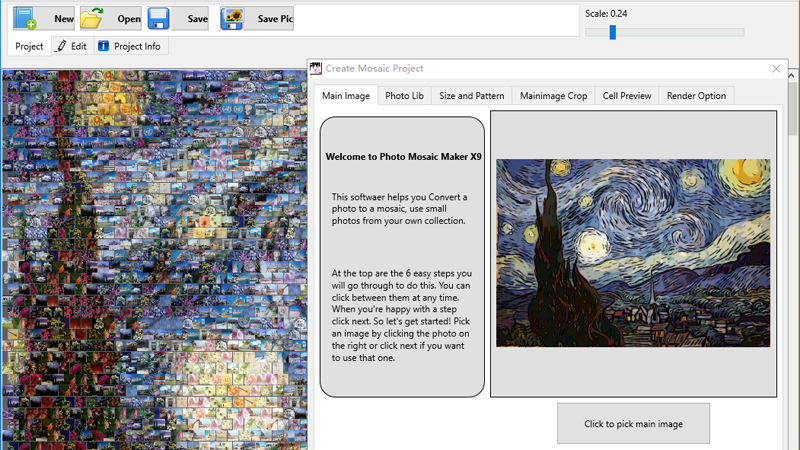
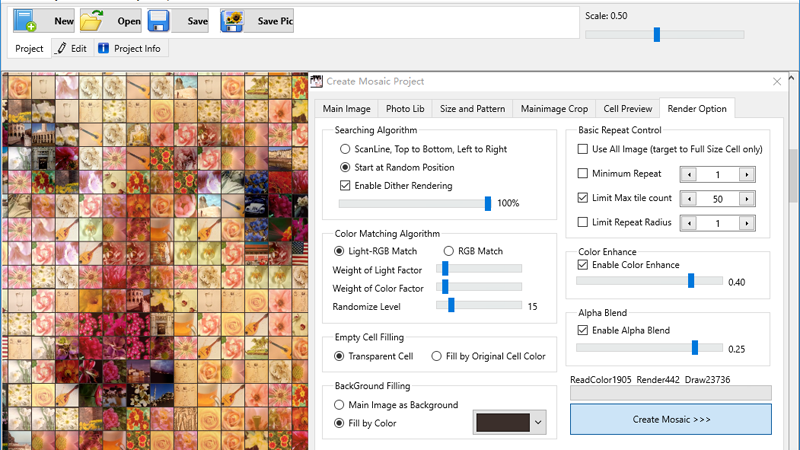
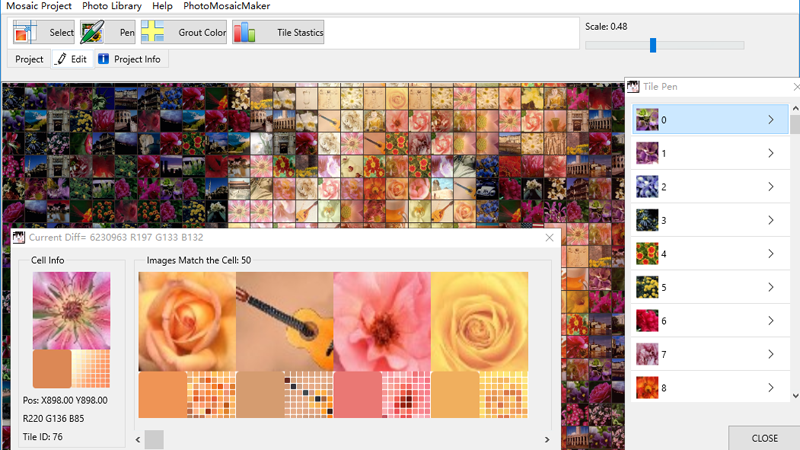
Real screens from Photo Mosaic Maker X9 — from project setup to per-cell refinement.
Features
Personal photo-library input
Use your own photo collection as the tile source.
Multiple cell shapes
Five cell shapes to define the mosaic’s texture.
Multiple pattern styles
Normal, cross and — in PRO — concentric-circle layouts.
Repetition controls
Limit how often any single photo reappears.
Cell-size range controls
Vary tile scale across the composition.
Gap-color controls
Tune the spacing color between cells.
Color matching
Keep the mosaic faithful to the main image’s tonality.
Cell editing
Adjust individual cells after generation.
Main-image cropping & preview
Frame the subject and review before rendering.
Mosaic rendering & output
Render the finished mosaic for digital use and print preparation.
How these controls affect the finished mosaic is explained in the technology section.
Tutorial: Create Your Own Photo Mosaic
Three steps from a folder of photos to a finished mosaic.
- Select the main image.
- Choose a cell shape and pattern, and set the mosaic size.
- Load your photo collection for the cells.
- Crop the main image and preview the division.
- Adjust render options — repetition, color match, gap color — and render.
- Done: print your mosaic or share it online.
01
Choose a Main Image
Simple shapes and clear contrast work best — the main image is what emerges from a distance. For a poster-size mosaic (about 2,400–3,600 tiles), a 100×100 px image is usually enough for a face or a simple object.
02
Gather Your Photo Collection
These photos become the tiles. Around 200 photos is the minimum for good quality; about 1,000 gives excellent variety. More than 2,000 also works, with longer processing.
03
Create Your Mosaic
Built for Larger Projects
Choose the desktop editions when the online workflow is not enough: libraries of thousands of photos, cell counts in the tens of thousands, concentric pattern styles, or professional output work.
Need capabilities beyond our current Standard and PRO editions? We can discuss custom software development for specialized workflows, additional functions or project-specific requirements. Tell us what you need, and we can assess whether a custom edition or tailored solution is possible — custom work is subject to technical evaluation and quotation.
Ask About Custom Editions